
When choosing an industrial label printer, one specification often raises questions:
Should you choose a 200 DPI, 300 DPI or 600 DPI print head?
While manufacturers provide technical specifications, the real question is how much difference these resolutions make on actual labels.
To find out, we conducted a side-by-side real-world print test using a label template approximately the size of a standard credit card. The same artwork, barcodes, QR codes, graphics and text were printed using three different print resolutions:
- 200 DPI (203 DPI industry standard)
- 300 DPI
- 600 DPI
The results were surprisingly revealing.
What Does DPI Mean in Label Printing?
DPI stands for Dots Per Inch, which measures the resolution of a thermal printer.
Higher DPI means the printer can place more dots within the same space, allowing it to reproduce finer details and sharper edges.
Common Industrial Label Printer Resolutions
| Resolution | Typical Applications |
|---|---|
| 200 DPI | Shipping labels, warehouse labels, pallet labels |
| 300 DPI | Product labels, compliance labels, asset labels |
| 600 DPI | Electronics, pharmaceuticals, micro labels, precision applications |
The higher the DPI, the greater the ability to print:
- Small text
- Fine lines
- Detailed logos
- Tiny barcodes
- High-density QR codes
- Complex graphics
Our Test Method
For consistency, we used:
- The same label design
- Credit card-sized label format
- Identical media
- Identical printer settings
- Three separate print head resolutions
This allowed us to isolate the effect of print resolution alone.
200 DPI Test Results
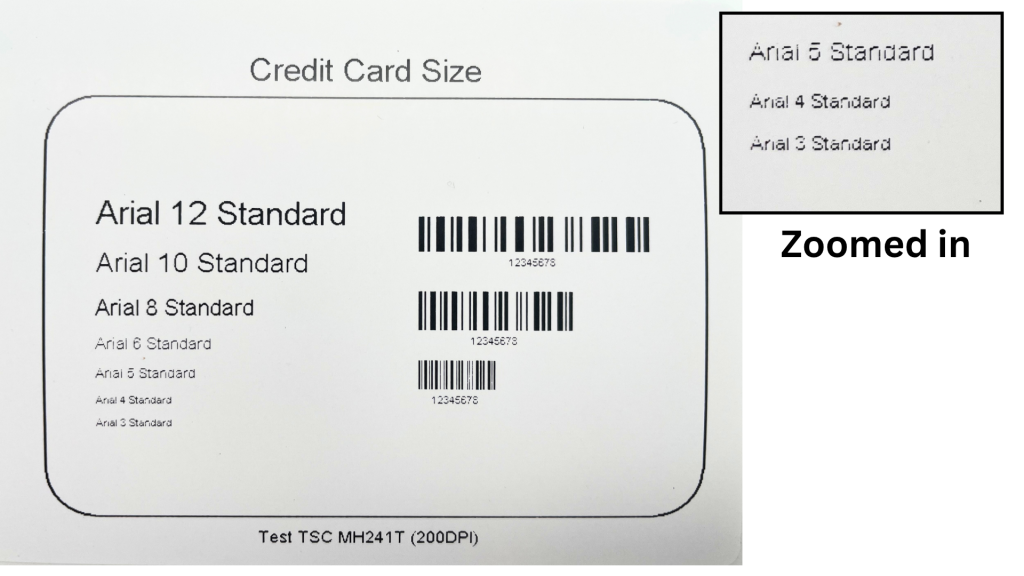
At first glance, the 200 DPI label looks excellent.
Large text is readable, barcodes scan successfully, and overall print quality meets the requirements of many industrial applications.
However, closer inspection reveals some limitations:
- Small text begins to soften
- Fine line detail is reduced
- Curved logo elements appear slightly jagged
- Dense QR codes lose edge definition
- Tiny barcode elements become less precise
For shipping, warehousing and logistics applications, these issues are rarely problematic.
For high-detail product labels, however, they become more noticeable.
300 DPI Test Results
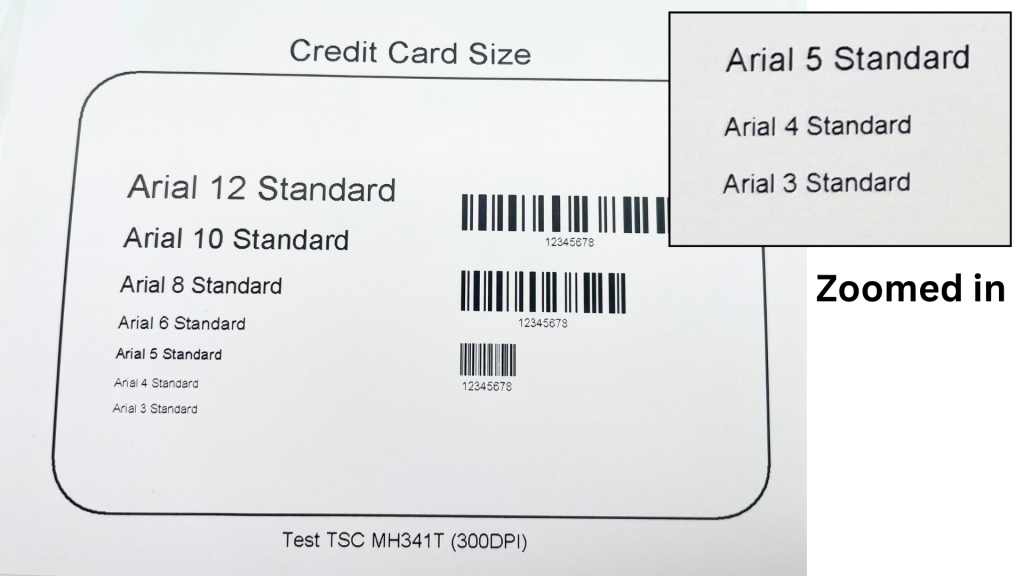
The jump from 200 DPI to 300 DPI creates an immediately visible improvement.
Small text becomes noticeably sharper and barcode edges are cleaner.
Key improvements include:
- Better character definition
- Improved logo reproduction
- Cleaner fine lines
- Enhanced QR code readability
- More precise barcode printing
For many manufacturers, 300 DPI represents the ideal balance between print quality, speed and cost.
This is why 300 DPI is often considered the preferred resolution for product identification labels.
600 DPI Test Results
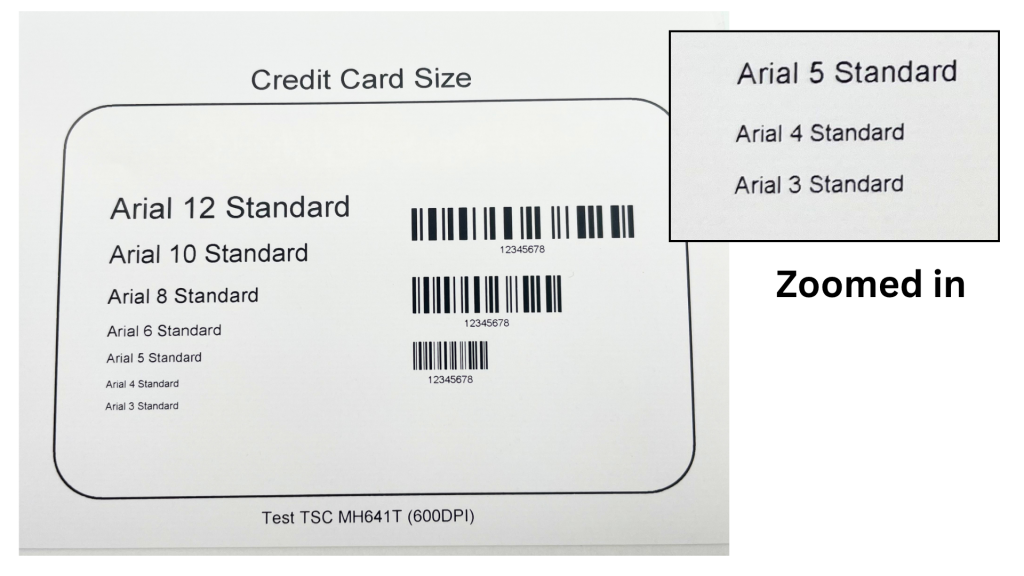
The 600 DPI sample delivered the highest level of detail in our testing.
When viewed at normal distance, the difference between 300 DPI and 600 DPI is subtle.
However, under close inspection, 600 DPI provides:
- Extremely crisp text edges
- Superior fine line accuracy
- Highly detailed logo reproduction
- Exceptional QR code definition
- Maximum barcode precision
Where 600 DPI really shines is in applications involving:
- Very small labels
- Electronics manufacturing
- Pharmaceutical packaging
- Tiny compliance labels
- Data-rich QR codes
- Micro text printing
The level of sharpness becomes especially apparent when printing fonts below 4 pt or extremely compact barcodes.
Side-by-Side Comparison
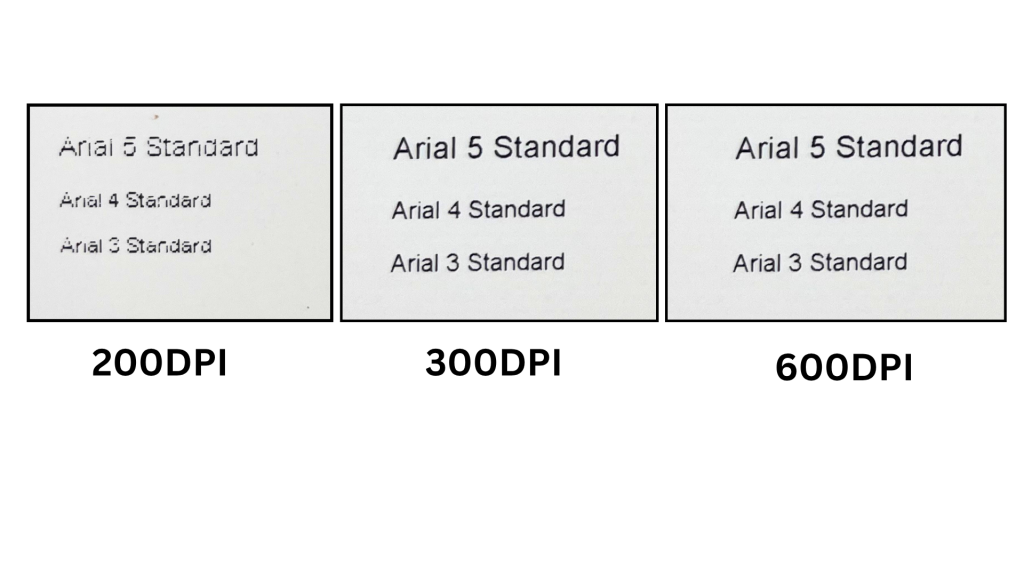
Comparing all three labels together highlights the progression in quality.
200 DPI
- Excellent for standard labels
- Lowest cost option
- Ideal for logistics and warehousing
300 DPI
- Noticeably sharper text
- Better barcode performance
- Excellent balance of quality and cost
600 DPI
- Maximum print precision
- Best for miniature details
- Premium solution for specialised applications
Barcode and QR Code Performance
One of the biggest differences appears when printing machine-readable codes.
200 DPI
Suitable for:
- Standard Code 128 barcodes
- Shipping labels
- Large QR codes
300 DPI
Recommended for:
- Product identification labels
- Smaller barcodes
- GS1 labels
- Data Matrix codes
600 DPI
Ideal for:
- High-density barcodes
- Tiny Data Matrix codes
- Electronics traceability
- Medical device labels
- Pharmaceutical applications
As barcode sizes decrease, higher resolution becomes increasingly important.
Is 600 DPI Always Better?
Not necessarily.
Many businesses assume higher resolution automatically means better value, but that’s not always true.
For many applications:
- A 200 DPI printer performs perfectly.
- A 300 DPI printer delivers excellent professional results.
- A 600 DPI printer may provide benefits that are only visible under magnification.
The best resolution depends entirely on your label design and application requirements.
Which DPI Should You Choose?
Choose 200 DPI If You Print:
- Shipping labels
- Warehouse labels
- Pallet labels
- Basic inventory labels
Choose 300 DPI If You Print:
- Product labels
- Asset labels
- Compliance labels
- Smaller barcodes
- QR codes
Choose 600 DPI If You Print:
- Electronics labels
- Pharmaceutical labels
- Micro labels
- Very small text
- High-density barcodes
- Detailed graphics
Final Verdict
After testing the same credit card-sized label at 200 DPI, 300 DPI and 600 DPI, one conclusion became clear:
200 DPI remains the industry workhorse.
300 DPI offers the best balance of quality and practicality for most product labelling applications.
600 DPI delivers exceptional detail for specialised applications where every dot matters.
If your labels contain small text, compact barcodes or intricate graphics, upgrading from 200 DPI to 300 DPI can provide a significant improvement.
For ultra-fine detail and precision printing, 600 DPI remains the benchmark.
If you’re unsure which print resolution is best for your application, contact Label Power for expert advice and sample testing.