
Driverless Cloud Printing Is Here: Connect TSC Printers Directly to BarTender Cloud
A simpler way to print labels. Compatible TSC printers can now connect directly to BarTender Cloud, without requiring a local Windows Print Gateway or virtual machine for the direct printing workflow.
Cloud-based label printing just became significantly simpler for TSC printer users.
Seagull Software has introduced direct support for compatible TSC CloudConnect printers in BarTender Cloud 12.4.
This integration allows organisations to connect supported TSC printers directly to BarTender Cloud and send print jobs without relying on a locally installed Windows Print Gateway or Windows virtual machine for that printing connection.
As an Australian distributor of both TSC label printers and BarTender software, Datamark Distribution can help businesses and resellers take advantage of this new capability.
BarTender Cloud now supports direct printer linking through TSC CloudConnect, helping simplify the infrastructure required for cloud label printing.
How Does Direct Cloud Printing Work?
Traditionally, printing from BarTender Cloud to locally connected printers required a Windows-based Print Gateway to receive and forward print jobs.
With CloudConnect-enabled TSC printers, the connection can be established directly between the printer and BarTender Cloud.
The result is a more streamlined cloud printing workflow with fewer locally managed software components.
Why Is This Important for Businesses?
Direct cloud printing can simplify deployment, particularly for organisations with printers across multiple locations.
No Local Print Gateway
Eliminate the need to maintain a dedicated Windows Print Gateway for supported direct cloud-connected printers.
Reduced IT Infrastructure
Avoid deploying Windows virtual machines solely to relay print jobs to compatible TSC printers.
Multi-Site Printing
Connect supported printers at different business locations to a centrally managed BarTender Cloud environment.
Simpler Printer Management
Linked printers appear within the BarTender Cloud Printers interface, where administrators can manage printer information and availability.
Native Printing Capabilities
Linked printers support optimised print code generation and compatible native printer functionality.
What Do You Need?
Direct cloud printing requires compatible hardware, software and firmware.
Compatibility and firmware requirements should be checked for each printer model before deployment.
Which TSC Printers Are Compatible?
BarTender lists the following printer families as compatible with CloudConnect. The specific printer model and firmware must be verified before installation.
| Category | Compatible Family | Example Model |
|---|---|---|
| Desktop | DH / TH Series | TH240T |
| Desktop | TX Series | TX210 |
| Industrial | MB Series | MB241 |
| Industrial | MH Series | MH241 |
| Industrial | ML Series | ML241P |
| Industrial | MX Series | MX241 |
| Print Engine | PEX Series | PEX2240 |
| Mobile | Alpha Series | Alpha-40L, Alpha-30L, Alpha-30R (Wi-Fi versions) |
Compatibility is subject to the specific model, firmware version and connectivity options. Contact Datamark to confirm suitability.
How to Link a TSC Printer to BarTender Cloud
BarTender Cloud includes a guided process for discovering and linking compatible TSC printers.
Confirm the printer supports CloudConnect and install the required firmware before beginning the connection process.
In BarTender Cloud, navigate to Administration > Printers and select Add Linked Printer.
Choose TSC as the printer manufacturer and download the connection certificate.
Configure the printer with the downloaded certificate files and required connection settings using the supported printer configuration interface.
Open the QR panel, complete the required connection configuration and select Start Discovery to identify eligible printers.
Select the printer from the discovery results, configure its details and complete the linking process. Once connected, it becomes available in BarTender Cloud.
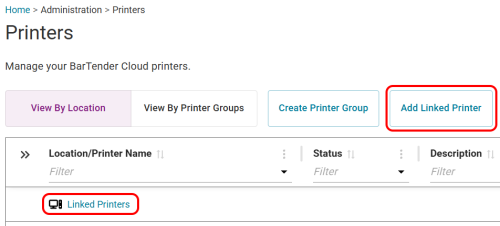
BarTender Cloud linked printer setup. Image: Seagull Software documentation.
For the complete configuration procedure, including certificate installation and printer network settings, see BarTender’s official linked printer instructions .
Ideal Applications for Cloud Label Printing
Direct cloud connectivity is particularly valuable for organisations that need centrally managed labelling across distributed operations.
Warehouse & Logistics
Print barcode labels, shipping labels and inventory identification labels across supported warehouse locations.
Manufacturing
Support product identification, packaging and traceability workflows using compatible industrial printers.
Retail & Distribution
Manage label printing across multiple stores, fulfilment centres or distribution sites.
Mobile Operations
Use compatible Wi-Fi-enabled TSC mobile printers in supported cloud-connected workflows.
TSC Hardware + BarTender Software: One Distribution Partner
As a distributor of both TSC label printers and BarTender labelling software, Datamark Distribution is well positioned to assist resellers and businesses evaluating direct cloud printing.
We can help with printer selection, BarTender Cloud licensing, firmware compatibility enquiries and planning a suitable labelling solution.
Whether you’re upgrading an existing thermal printer environment or deploying a new cloud-based labelling solution, our team can help you evaluate the available options.
Frequently Asked Questions
Do TSC printers now work directly with BarTender Cloud?
Yes. Supported TSC CloudConnect printers can now link directly to BarTender Cloud without requiring a local Print Gateway for that printing connection.
Do I need BarTender Cloud Enterprise?
No. Direct linked printing is supported with BarTender Cloud Automation and Enterprise subscriptions. Essentials does not include the feature.
Will my existing TSC printer work?
It depends on the model, firmware and connectivity capabilities. Supported printers require updated CloudConnect-compatible firmware.
Does driverless printing mean no printer configuration is required?
No. Direct printing removes the requirement for a local Windows Print Gateway, but the printer must still be configured and connected to BarTender Cloud.
Can Datamark supply both the printer and BarTender Cloud subscription?
Yes. Datamark distributes TSC label printers and BarTender labelling software and can assist with product selection and licensing.
Ready to Connect Your TSC Printers Directly to BarTender Cloud?
Talk to Datamark Distribution about compatible TSC printers, BarTender Cloud subscriptions and direct cloud printing requirements.
Enquire About Cloud Printing → Email Our TeamFurther Information
BarTender Cloud 12.4 – TSC Direct Printing
Product compatibility, firmware availability, licence features and technical requirements are subject to vendor specifications. Confirm compatibility before purchasing or deploying a cloud printing solution.